Beauty Camera - Selfie Camera
- 4.7
- Rating
- 5.00M
- Installs
- Free
- Price
 Analysis by App-foxy
I tried Beauty Camera - Selfie Camera as a quick, casual beauty editor rather than treating it like a full photography studio. That distinction matters. The app is built for taking a selfie, making a visible change in a few taps, and adding a playful finish with effects, filters, stickers, or editing tools. It is a free beauty app from Mobile Minds Dev, and its large audience suggests that this straightforward approach works for many people.
My first impression was that it aims to reduce the time between opening the camera and getting something shareable. I did not approach it expecting professional retouching controls or a replacement for a dedicated photo editor. Instead, I looked at whether the app makes ordinary selfies easier to improve, whether the controls feel understandable, and whether the free experience gives you enough room to decide if it belongs in your regular camera routine.
What the app feels like in everyday use
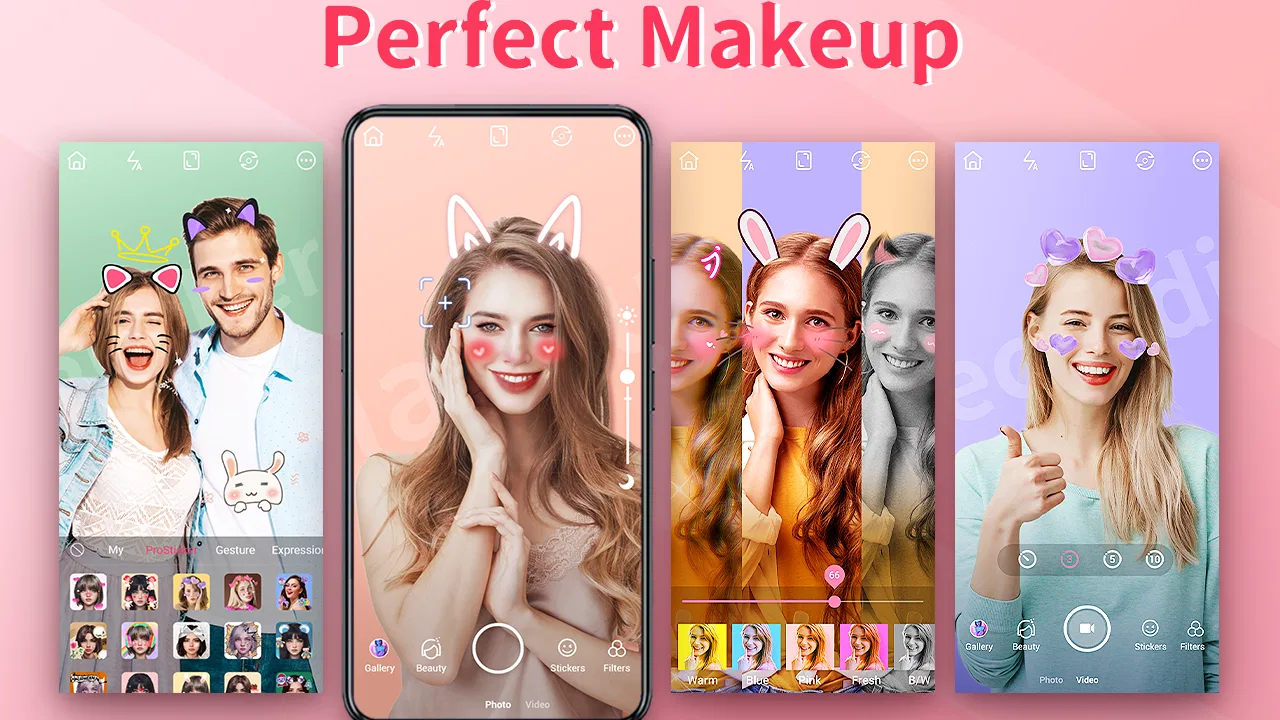
The strongest use case is the unplanned selfie. Imagine getting ready to meet friends, wanting a new profile picture, or taking a quick photo in uneven indoor light. With a conventional camera app, you usually take the picture first and then move to another editor. Here, the beauty-camera idea keeps those steps closer together: you can experiment with a filter or effect while deciding how much personality you want the final image to have.
You May Also Like

 AccuWeather: Weather Radar
AccuWeather Review: A Quick, Clear Forecast for Everyday Decisions
For everyday plans, the best forecast is the one you can understand quickly. AccuWeather makes rain timing, radar, and local conditions easy to act on, with a few trade-offs.

 Hill Climb Racing
Why Hill Climb Racing Still Turns Crashes Into One More Run
A tiny car, a bumpy hill and one more upgrade: Hill Climb Racing keeps resurfacing because its simple chaos makes every near-miss feel personal.

 AliExpress - Shopping App
AliExpress Makes Global Shopping Feel Personal, but Shoppers Bear the Risk
AliExpress turns a global marketplace into a pocket-sized discovery engine. Its reach is useful, its shopping loop compelling, and its trade-offs easy to miss.

 Lords Mobile: Kingdom Wars
Lords Mobile Is a Kingdom-Building Routine, Not a Quick Match
A case-by-case verdict on the building, battles, device demands, and social commitments that make Lords Mobile rewarding for some players and exhausting for others.

 PDF Scanner app - TapScanner
TapScanner Makes Paperwork Easier to Capture, Check, and Share
TapScanner makes scanning with a phone feel less like a rescue operation and more like a dependable step in getting work done. Its capture tools are useful, though not flawless.

 Block Blast!
 Shows How Much a Puzzle Game Can Leave Out
A quiet grid game shows why puzzle players increasingly value instant clarity, repeatable skill and low-pressure play—and where the genre still needs to catch up.
More From Our News Desk
View All News


I especially like this approach for people who want a polished result without learning a complicated editing workflow. The combination of trendy effects, filters, stickers, and an editor gives the app several moods. A restrained filter can make a routine portrait feel more consistent, while a sticker or stronger effect suits a casual post where realism is not the main goal.
That flexibility also creates the app’s first important trade-off. A beauty tool can make a photo look better quickly, but the most dramatic options can also make it look less like you. I found that the best results come from treating the effects as finishing touches rather than applying every available option at once. If you want a natural portrait, start with the least noticeable adjustment and stop as soon as the image looks clearer or more balanced.
The app is aimed at a broad audience. Its content rating is Everyone, and it runs on Android devices using version 6.0 or later. That makes it accessible to people using older phones, although the experience can still vary depending on camera quality, screen size, and how much processing a particular device handles comfortably.
Why the simple workflow is useful
Many users do not need a long list of professional controls. They need a camera that helps them avoid a dull result when the lighting is not ideal, then lets them add a little style. Beauty Camera fits that habit better than an editor designed around layers, curves, masks, or manual color correction.
One practical workflow I recommend is to take several versions of the same selfie with different levels of styling, then compare them before saving or sharing. The first version can be your natural baseline. The second can use a gentler filter. The third can include a sticker or more visible effect. This makes it much easier to notice when an effect has gone from flattering to distracting.
Another useful habit is separating correction from decoration. I would first decide whether the face and background look acceptable, then add a sticker or trend-focused effect afterward. If you decorate too early, it becomes harder to judge whether the underlying photo is actually good. This small change in order saves time and prevents a visually busy result.
Controls, choices, and the question of trust
When I review a camera app, I pay attention not only to the final picture but also to the moments where the app asks me to make a choice. A beauty camera handles personal images, so I want the experience to make the important actions understandable. The useful questions are simple: can I decide when to take a picture, can I choose whether to apply an effect, and can I avoid sharing anything until I am ready?
Beauty Camera’s appeal depends on visible, immediate controls. Filters, effects, stickers, and editing options are meaningful because they let the user shape the result instead of accepting one automatic look. I prefer that kind of interaction to an app that hides every decision behind a single “enhance” button. Even when the changes are quick, seeing the style before committing gives you more control over the final image.
That does not mean every control will suit every user. People who want precise retouching may find a lightweight beauty editor limiting. If your goal is to adjust individual facial areas with exact numerical control, create complex composites, or manage a detailed editing history, you may be happier with a dedicated photography application. This app is more convincing when speed and approachability matter more than technical depth.
It is also worth checking the choices presented by your own device and app environment whenever you install a camera tool. I would review the permissions requested during setup and allow only what is needed for the actions I intend to use. I would also avoid treating an editing app as a private vault for sensitive images. The safest routine is to work with the photo you need, save the finished version deliberately, and remove unwanted drafts from the device afterward.
I cannot responsibly turn a beauty app’s existence into a promise about privacy or data handling. Trust should come from the permission prompts, the controls you can actually see, and the choices available on the device. That is why I recommend reading each access request rather than tapping through setup automatically. If a permission does not make sense for the feature you are using, pause and decide whether you are comfortable continuing.
Where personal control matters most
The most sensitive moment is not usually adding a sticker. It is deciding what happens to a face photo after editing. I prefer to keep the process intentional: take the image, review it, make the changes, and share it only through the service I choose. A quick editor can encourage impulsive posting, especially when the result looks immediately polished.
For profile pictures, I would keep a copy of the unedited original before experimenting. That gives you a fallback if a filter looks too strong or if you later want a different style. It also prevents the common mistake of overwriting the only version of a personal photo with an effect that cannot be reversed easily.
For images involving friends or family, I would ask before applying a recognizable beauty effect or sharing the result. A sticker may be harmless, but a strong face-altering filter can change how someone feels about the photo. The app gives you creative tools; it cannot make the social decision for you. That part remains with the person holding the phone.
Parents and younger users may appreciate the Everyone rating, but the rating should not replace ordinary supervision around camera and sharing habits. A child-friendly content classification describes the intended audience; it does not automatically explain every permission prompt or every destination where a saved image might later be posted. I would still show younger users how to review a picture and how to cancel sharing.
How it compares with familiar alternatives
Compared with the standard phone camera, Beauty Camera is more focused on instant presentation. The regular camera is usually the better choice when you want the most neutral capture, maximum control over the original image, or a photo that you will edit carefully later. Beauty Camera is more convenient when you already know that you want a filter, effect, sticker, or beauty-oriented finish.
Compared with a full photo editor, it is less intimidating but also less suitable for detailed work. A professional-style editor may give you stronger control over color, exposure, cropping, and selective adjustments. That is valuable for landscapes, product photos, or carefully prepared portraits. For a quick selfie, those extra controls can feel like unnecessary homework. Beauty Camera earns its place by shortening that decision process.
It also differs from social-network camera tools. Social apps often connect capture directly to posting, which can be convenient but may push you toward sharing before you have reviewed the result. A standalone beauty app can be a calmer middle step: create the image first, inspect it, and decide later where it belongs. For users who want to separate editing from publishing, that is a meaningful advantage.
The choice becomes clearer if you identify your priority. Choose this app when you want fast selfie styling and playful options. Use the regular camera when preserving a natural original is the main concern. Pick a more advanced editor when exact corrections or serious image management matter. None of those choices is universally better; they serve different habits.
What the free version means in practice
The app is free to install, which makes it easy to test without committing money at the start. It also includes in-app purchases ranging from $1.99 to $19.99 per item. I would treat that as a reason to explore the free workflow first, then decide whether any paid item genuinely improves the way you use the editor.
My advice is not to judge the app by the presence of optional purchases alone. The more useful question is whether the no-cost tools are enough for your normal selfies. If you only need an occasional filter or sticker, the free access may cover your routine. If you plan to use the app frequently and want a wider selection of styling choices, you should examine each purchase carefully before confirming it.
Keep purchase controls in mind if more than one person uses the same phone. A beauty app is easy to hand to a friend or child for a quick photo, and an accidental tap can become an unwanted transaction. Device-level purchase authentication is a sensible safeguard, particularly when the app offers several optional items at different prices.
Performance expectations and practical limitations
Camera and editing apps are sensitive to the phone they run on. A device that meets the Android requirement may still produce a different experience from a newer model with a stronger camera and faster image processing. I would keep expectations realistic on older hardware: preview effects may feel less fluid, and saving a heavily styled image may take longer than taking an ordinary photo.
Lighting remains more important than any filter. Beauty effects can soften the appearance of a portrait, but they cannot fully rescue a face hidden in deep shadow or a background with harsh highlights. I get better results by facing a window, cleaning the camera lens, and leaving a little space around the head and shoulders before applying an effect. Those simple steps make the editor work with better material.
Stickers and trendy effects are also easy to overuse. They can be exactly right for a playful message or a casual social post, yet feel out of place on a professional profile. I would create separate versions for different purposes instead of trying to make one edited image work everywhere. That is a small but important advantage of keeping the original available.
Another limitation is creative consistency. If you use a strong effect on every image, your photos may begin to look alike. I prefer choosing a small personal rule, such as using a subtle filter for portraits and saving stickers for informal images. This keeps the app from turning every picture into the same template.
Who will get the most from it
I would recommend Beauty Camera to someone who wants a friendly selfie editor with quick visual changes and does not want to study a professional interface. It is a good match for casual portraits, profile-photo experiments, birthday messages, and creative posts where filters and stickers are part of the fun.
It is also useful for people who often decide what an image needs while looking at it. Instead of planning a detailed edit in advance, you can try a few styles and judge the result immediately. That trial-and-comparison approach is one of the app’s practical strengths, especially when you are preparing a photo in a hurry.
I would be more cautious about recommending it to photographers who care about an untouched original, exact retouching, or a carefully managed archive. It is not the tool I would choose for a product shoot, a serious portfolio, or any situation where natural detail and technical control are more important than speed. Those users should start with the standard camera or a more advanced editor.
I would also skip it if you are uncomfortable reviewing permissions and purchase settings yourself. Any camera app deserves that attention, and this one is no exception. The app can make image creation simpler, but it does not remove the need for sensible decisions about access, storage, and sharing.
My considered verdict
Beauty Camera - Selfie Camera succeeds because it understands a common phone habit: take a face photo, improve it quickly, and give it a little character. Mobile Minds Dev has positioned it as an approachable beauty app rather than a demanding production tool. Its average rating is 4.7 from around 22 thousand ratings, and it has passed five million installs, so it clearly has broad appeal.
Those figures do not decide whether it is right for you, but they do fit my experience of the app’s role. It is easy to understand, flexible enough for casual styling, and more playful than the standard camera. The free entry point is helpful, while the optional purchases mean I would explore the available tools carefully before spending anything.
My main recommendation is to use it with a light touch. Begin with good lighting, compare the natural image against the edited version, and keep the original before adding stronger effects. Review permission prompts, protect purchases with device authentication, and make sharing a deliberate final step. The best result is the one where you still control the photo, rather than the effect controlling the photo for you.
For quick selfies and expressive edits, I think it is worth trying. For precise photography, strict privacy expectations, or advanced retouching, I would choose a different kind of tool. That balance is what makes this app useful: it is not trying to solve every photography problem, but it can make an ordinary selfie more enjoyable when speed, simplicity, and personal style are what you want.
FAQs for Beauty Camera - Selfie Camera
01What features does Beauty Camera - Selfie Camera offer to enhance my selfies?
Beauty Camera - Selfie Camera provides a wide array of features designed to enhance your selfies effortlessly. These include real-time filters, skin smoothing, blemish removal, and teeth whitening. The app also offers advanced editing tools like facial reshaping and makeup effects, ensuring you capture the perfect shot every time.
02Is Beauty Camera - Selfie Camera easy to use for beginners?
Yes, Beauty Camera - Selfie Camera is designed with a user-friendly interface, making it accessible even for beginners. The intuitive design allows users to easily navigate through filters and editing tools. Step-by-step guides and tutorials are also available to help new users maximize the app’s potential.
03Does Beauty Camera - Selfie Camera require an internet connection to function?
Beauty Camera - Selfie Camera operates efficiently without an internet connection for most of its features, including capturing photos and applying basic filters. However, certain functionalities, such as downloading new filter packs or sharing photos directly on social media, may require an active internet connection.
04Are there any in-app purchases or subscriptions in Beauty Camera - Selfie Camera?
While Beauty Camera - Selfie Camera is free to download, it does offer in-app purchases for additional features and enhancements. These may include premium filters, exclusive editing tools, and ad-free experiences. Users can choose to make one-time purchases or subscribe to a monthly plan for full access.
05How does Beauty Camera - Selfie Camera handle user privacy and data security?
Beauty Camera - Selfie Camera prioritizes user privacy and adheres to strict data protection regulations. The app only requests permissions necessary for its functionalities, such as camera and storage access. All personal data is encrypted, and the app provides clear privacy policies regarding data usage and storage.
Pros
- Easy-to-use interface for quick editing.
- Wide range of filters to enhance photos.
- Real-time beauty effects for selfies.
- High-resolution output without quality loss.
- Frequent updates with new features.
Cons
- Contains ads that can be intrusive.
- Some features require in-app purchases.
- Occasional app crashes on older devices.
- Limited editing functions in free version.
- Large app size may consume storage.

Beauty Camera - Selfie Camera
Gallery